Copyright (c) 2021 Transpayrent ApS.
The Transpayrent SDK simplifies the strong consumer authentication (SCA), payment authorization and secure card storage using tokenization through the consumer's browser while handling PCI DSS compliance.
The SDK handles the secure communication with Transpayrent's Payment Gateway and orchestrates the integration into 3 simple steps for the scenarios summarized in the table below.
| Authorize Payment | Store Payment Card |
|---|---|
| The payment maybe be authorized for a payment transaction using the card details entered by the consumer in the following simple steps: | The consumer's payment card may be securely stored in Transpayrent's Secure Vault and added to the consumer's wallet in the following simple steps: |
Please note that the SDK is intended to communicate directly with Transpayrent's Payment Gateway to handle PCI DSS compliance for authentication, authorization and storage.
The SDK handles the authentication by orchestrating the calls to several methods internally and automatically performing the following actions if required:
- Fingerprint the consumer's brower in an invisible iframe
- Display an authentication challenge to the consumer in an iframe
The look'n'feel of the authentication challenge may be fully customized using CSS simply by passing the appropriate iframe configuration when invoking the SDK's authenticate method. Communication with Transpayrent's Payment Gateway is done asyncronously using Promises.
The sequence diagram below illustrates the communication flow for authorizing the payment for a payment transaction when using the Transpayrent SDK:
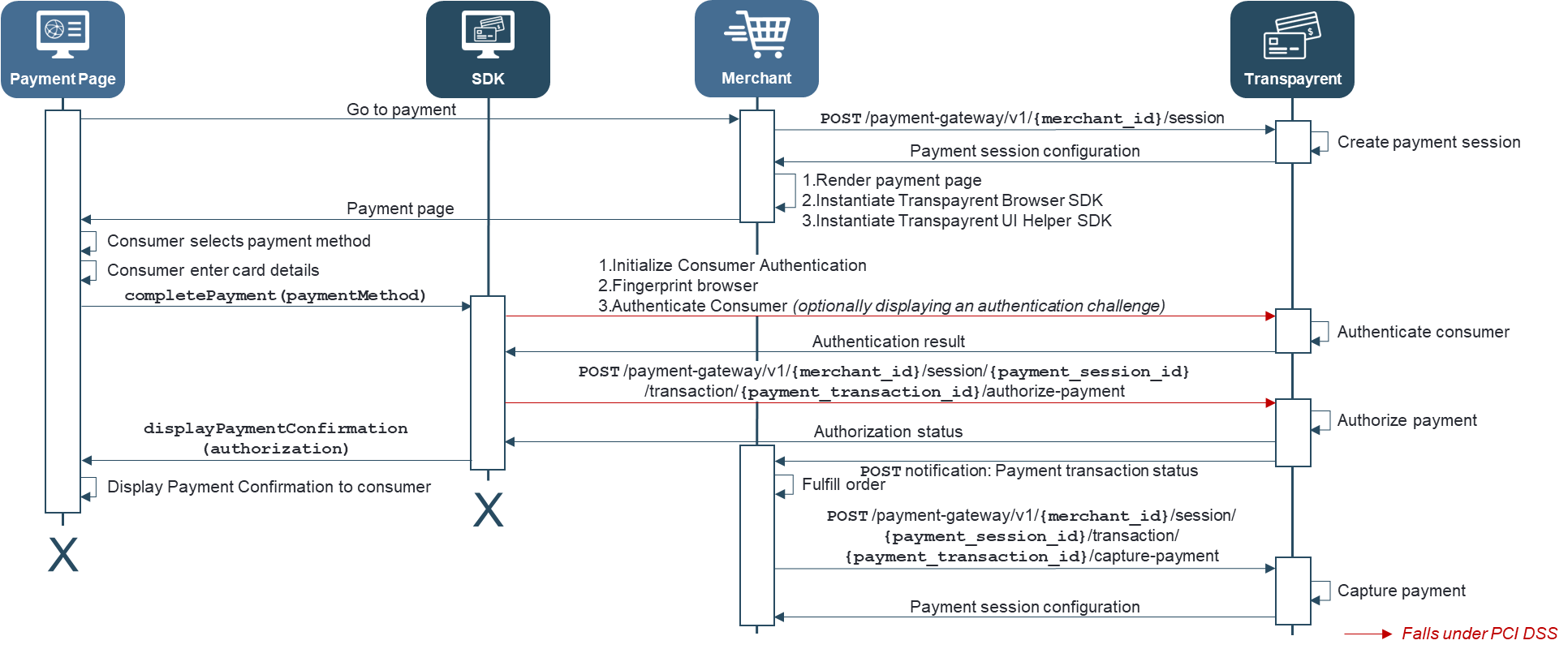
The sequence diagram below illustrates the communication flow for securely storing the consumer's payment card in Transpayrent's Secure Vault and adding it to the consumer's wallet when using the Transpayrent SDK:

Please note that the communication highlighted with red falls under PCI DSS compliance and must be made directly from the Transpayrent SDK to the Transpayrent Payment Gateway to handle compliance
Successfully completing a payment using the SDK takes 5 simple steps:
- Merchant back-end creates a new payment session
- Merchant back-end renders the payment page and instantiates the Transpayrent SDK
- The payment page creates a new payment transaction using the SDK
- The payment page authenticates the consumer with 3D Secure or equivalent using the SDK
- The payment page authorizes the payment for the payment transaction using the SDK
Securely storing a payment card and adding the stored card to the consumer's wallet takes 5 simple steps using the SDK:
- Merchant back-end creates a new payment session
- Merchant back-end renders the payment page and instantiates the Transpayrent SDK
- The payment page creates a new payment transaction using the SDK
- The payment page authenticates the consumer with 3D Secure or equivalent using the SDK
- The payment page saves the consumer's payment card using the SDK
The code sample below provides a complete illustration of how the payment page uses the SDK to create a new payment transaction, authenticate the consumer, securely store the payment card and authorize the payment using the stored card for a payment transaction.
Please note that the sample assumes a payment session has already been created as outlined in step 1. Merchant back-end creates a new payment session above.
<script src="https://storage.googleapis.com/static.[ENVIRONMENT].transpayrent.cloud/v1/swagger-client.js"></script>
<script src="https://storage.googleapis.com/static.[ENVIRONMENT].transpayrent.cloud/v1/transpayrent.js"></script>
<script>
    // SDK configuration
    var transpayrentConfig = {
        merchantId: [UNIQUE MERCHANT ID ASSIGNED BY TRANSPAYRENT],
        sessionId: [ID IN THE RESPONSE FROM "Create Payment Session"],
        accessToken: '[x-transpayrent-access-token HTTP HEADER IN THE RESPONSE FROM "Create Payment Session"]'
    };
    var url = 'https://generator.[ENVIRONMENT].transpayrent.cloud/v1/'+ transpayrentConfig.merchantId +'/system/PAYMENT_GATEWAY/sdk/CLIENT';

    //
    var body = { correlation_id : 'TP-103645',
                 amount: { currency : 208,          // DKK
                           value : 100 } };
    var card = { payment_method_id: 109,            // VISA
                 card_number: 4111111111111111,     // Successful Authorization: Manual Challenge with browser fingerprint
                 expiry_month: 9,
                 expiry_year: 22,
                 cvv: 987,
                 card_holder_name: 'John Doe',
                 save: true };
    var address = { street : 'Arne Jacobsens Allé 7',
                    appartment : '5. sal',
                    city : 'Copenhagen S',
                    postal_code : '2300',
                    state : 'CO',
                    country: 208 };                 // Denmark
    var phone = { international_dialing_code: 45,   // Denmark
                  phone_number: 12345678 };
    var email = 'hello@transpayrent.dk';
    var save = { card : card,
                 consumer_id : '[MERCHANT'S CONSUMER ID FROM PAYMENT SESSION]',
                 name : 'My VISA Card' }
    var ssoToken = '[MERCHANT'S SINGLE SIGN-ON TOKEN FOR AUTHORIZING A PAYMENT WITH THE CONSUMER'S WALLET]';

    // Instantiate Transpayrent SDK
    var sdk = new Transpayrent(url, transpayrentConfig);

    // Create payment transaction for securely storing the consumer's payment card and add the stored card to the consumer's wallet
    sdk.createTransaction(card.payment_method_id, { amount: { currency : 208,   // DKK
                                                              value : 0 } })
    .then(
        transaction => {
            // Creation of Payment Transaction failed - Display status message
            if (transaction.status) {
                alert('API: '+ transaction.api +' failed with HTTP Status Code: '+ transaction.status);
                return Promise.reject(null);
            }
            else {
                var body = { card : card,
                             billing_address : address,
                             shipping_address : address,
                             contact : { mobile : phone,
                                         work : phone,
                                         home : phone,
                                         email : email } };
                var iframeConfig = { container : document.body,
                                     css: 'challenge',
                                     callback : function (event, iframe) {
                                         switch (event) {
                                             case 'authentication-challenge-initiated':
                                                 // DO SOMETHING BEFORE THE AUTHENTICATION CHALLENGE IS DISPLAYED
                                             break;
                                             case 'authentication-challenge-completed':
                                                 // DO SOMETHING AFTER THE AUTHENTICATION CHALLENGE IS COMPLETE
                                             break;
                                         }
                                    } };
                return sdk.authenticate(transaction.id, body, iframeConfig);
            }
        })
    .then(
        authentication => {
            // Consumer Authentication failed
            if (authentication.status) {
                // Consumer Authentication failure
                if (authentication.status == 511) {
                    alert('Consumer failed authentication challenge for payment transaction: '+ authentication.transaction_id);
                }
                // API request failed - Display status message
                else {
                    alert('API: '+ authentication.api +' failed with HTTP Status Code: '+ authentication.status);
                }
                return Promise.reject(null);
            }
            // Consumer Authentication succesfully completed
            else {
                save.card.cryptogram = authentication.cryptogram;
                return sdk.save(authentication.transaction_id, save);
            }
        })
    .then(
        save => {
            // Saving Payment Card failed - Display status message
            if (save.status) {
                alert('API: '+ save.api +' failed with HTTP Status Code: '+ save.status);
                return Promise.reject(null);
            }
            // Payment card succesfully saved and added to the consumer's wallet
            else {
                var request = { payment_method_id: 201,            // Consumer Wallet
                                valuable_id : save.valuable_id,
                                access_token : ssoToken }

                // Create new transaction for authorizing a payment with the stored card
                return sdk.createTransaction(request.payment_method_id, body)
                    .then(
                        transaction => {
                            // Creation of Payment Transaction failed - Display status message
                            if (transaction.status) {
                                alert('API: '+ transaction.api +' failed with HTTP Status Code: '+ transaction.status);
                                return Promise.reject(null);
                            }
                            // Authorize the payment for the payment transaction using the consumer's stored card
                            else {
                                return sdk.authorize(transaction.id, request);
                            }
                        });
            }
        })
    .then(
        authorization => {
            // Payment Authorization failed - Display status message
            if (authorization.status) {
                alert('API: '+ authorization.api +' failed with HTTP Status Code: '+ authorization.status);
            }
            // Payment Authorization completed - Display success message
            else {
                alert('Payment transaction: '+ authorization.transaction_id +' successfully authorized');
            }
        })
    .catch(reason => {
        // Low level error - Display error message
        if (reason) {
            console.error(reason);
        }
    });
</script>